//make posts preview with a thumbnail
Showing posts with label Email Marketing. Show all posts

Friday, March 21, 2014

Attention Bloggers - 4 Spring 2014 Marketing Trends You Need To Know About

“And if you don’t know, now you know…”


4 Spring 2014 Marketing Trends


You Need to Know About


Earlier this year, the 2014 marketing “predictions” and “resolutions” rolled out (including this 6-times-fabulous list).

It’s March now. The dust has settled, and we’ve picked through it. Three of these trends, we wouldn’t have guessed a year ago, but all of them are absolutely making an impact:

1) SOCIAL CONSCIENCE


Trendy Selling Point: The Blog With A Social Conscience


Job creation, joining up with local charities, waste-free product packaging, even weight management – any way your blog does good, show it off.

Consumption’s damaging effects are well-known, but consumers are still addicted to little indulgences, which means they prefer purchases with guilt-free status attached, as explained on Trendwatching.

Glimpse in the real world:


Starbucks has this one down. Recyclable cups, Fair Trade blends and trash cans labeled “Landfill” are the old news. This year, they’ll add a store made of shipping containers, and I guarantee the response will be:

“Oh, my goodness, look how eco-conscious (and also clever!) Starbucks is!”

The story you choose to tell should become part of your branding. But think twice before spinning off a bunch of related marketing content, because…


2) OVERCROWDING EFFECT


The Overcrowded Trend: Content Marketing


…there’s a heck of a lot of marketing content already out there.

“Too many marketing shops will have pursued content marketing…brands are competing with, well, everything else for attention,” says Patrick Spenner of Forbes here.

This means ordinary blog posts and articles won’t cut it. Your content needs to be absolutely unique.

Two ways to counter this:


1. Type your intended content topic into a search engine, hit enter and absorb the current listings already out there. If your angle isn’t fresh, find a new one.

2. Try something bigger. “Live events, case studies and (if companies can afford it), branded content tools,” suggests Sherice Jacob on Kissmetrics. “These things deliver much more value, brand awareness, backlinks and discussion than a simple social share.”

Now, as for where to put the content you do create…

3) TIMEOUT ON NEWS TRENDS


Jumping On New Marketing Channels Too Quickly


Forbes reported a pattern of larger companies shunning new marketing channels until they master and get the most from their current channels.

“In short, they aren’t getting all the way up to the productive part of the learning curves before they get sucked into new ones,” Spenner explains. “During their 2014 timeout, they plan to get their you-know-what together on all the technology changes from the last five years, before they introduce any new ones.”

Why it’s okay to catch your breath:


Social media is a market, too, and its near-saturation of already existing channels means your followers and fans are less likely to jump on these new ones.

So take a bit of time to make sure you’re proficient in the channels you’re already on before dipping your toes in elsewhere.


4) KEYWORDS ARE NOT EVERYTHING


Trend Over (But Not Quite Out): Keywords As The SEO Mainstay


Since Google and other search engines must continually combat efforts to game the search system, they update their algorithms often.

Keyword usage and density are receiving much less attention of late, Nicole Fallon of BusinessNewsDaily reports.

What’s in? “Unique content and social media signals [likes and shares].”

What to focus on instead:


We’ve been saying it forever, but Fallon recommends “…[aiming] efforts toward creating content that is tailored and useful for their target audience.

For example, create more lifestyle-oriented content in the form of blog posts, videos and other types of media that encourage sharing by readers.” (And of course, those less-traditional content formats mentioned above.)

So. Who’s In?


We had a lot of “Ohh, that makes sense,” moments when we dug up these trends.

Are any of you feeling the same way? Can you get on board with any of these ideas in particular?

Originally posted on aweber.com
Read More »

Tuesday, February 11, 2014

Darth Vader's Email Marketing Lessons


We all know that Star Wars is full of life lessons. After all, it’s pop culture’s ultimate morality play, with clear-cut instructions for deciding right and wrong, as well as ultra-cool examples of all those roads not taken and detours missed. Unfortunately, many of us are so caught up in cheering for the good guys that we miss the extremely valuable life lessons that Darth Vader and his ilk can teach us.Lord Vader was no slouch when it came to self-promotion. How else do you think he rose to the top of his nefarious profession? During his early years as a fledgling Sith lord, there’s no doubt that Vader’s email marketing skills must have been prodigious. In fact, if you take an even closer look at Star Wars, you can pick up a number of subliminal hints that can help you with your own email marketing strategies. Consider these strategies used by the Great Helmeted One himself.


Darth Vader's Email Marketing Lessons


Reach Out to the Multitudes, but Target Your Audience


Darth Vader wasn’t merely satisfied with running a kingdom or two; galactic domination was his goal, and in business, it should be yours too. Lord Vader’s mistake was that, instead of utilizing the talents of his minions, he only wanted to crush them all under the heel of his black durasteel combat boots. You can avoid the same mistake by targeting your email audience. Use social networking sites to learn about their preferences and cater to these with your email marketing campaign. Speaking of social networking….

Engage Your Audience


Throughout the Star Wars saga, Darth Vader didn’t merely bark orders; he also engaged in challenging dialogues with enemies such as Luke and Obi Wan-Kenobi, provoking them by knowing just which buttons to push to get the optimum reaction. In the same way, you’ll want to engage your email prospects by appealing to their interests, then creating stimulating conversations with them. One way to do this is to post contests, surveys or question-and-answer sessions, either on your website or via your Facebook and Twitter pages. You’ll not only find out about your target audience, but you’ll also get lots of new email addresses for your mailing list.

Believe in Your Product


When Darth Vader tells Imperial Officer Motti, “I find your lack of faith disturbing,” he’s giving utterance to his life’s credo: believe in yourself — and in your message. When you show others that you believe in your product, they’ll get the message right away, without you having to resort to a Darth Vader death grip.

Create Pithy Content, and Keep it Simple


When Darth Vader pronounced those memorable words, “I am your father,” he made cinematic history with one simple sentence. Vader is a man of few words, but those words are always compelling. By being direct and getting to the heart of the matter without a lot of fluff, you can produce email content that’s actually being read, not deleted.

Technology is Your Friend


Lord Vader and his minions used only the newest state-of-the-art technologies, all of which were encapsulated in the Death Star. Except for extenuating circumstances, propelled by the power of the Force, the Death Star would have been a splendid high-tech center of galactic operations for the Empire. In much the same way, you can embrace technology by using analytics to measure your return on investment (ROI) as well as your response activity in your email marketing campaign.

Use Tracking Tools to Measure Performance


Darth Vader implemented a tracking device on the Millennium Falcon so that he and his minions could follow the ship to Yavin IV, the hidden base of the rebels. If it wasn’t for the power of the Force (more about that later), the scheme might have worked. By following Vader’s strategy and implementing tracking tools in your email marketing, you can uncover valuable demographics, such as where your target prospects live and what types of products they like and buy. Likewise, you can also use tracking tools to find out whether or not your emails have been opened, and which links have been clicked and followed.

Dodge Spam Filters


Darth Vader destroyed Alderaan because it was a nuisance to the Empire. In much the same way, spam filters are a nuisance to email marketing; but the good news is there are ways to handle those pesky email rebels. By using a dedicated IP address, as well as email service providers that are specially designed for marketing purposes, you can dodge spam filters as adroitly as Darth Vader sidesteps those light-saber swipes in his final battle with Obi-Wan Kenobi.

Test Your Emails


Darth Vader was a strong believer in testing your methods to make sure they’re going to succeed when it really counts. For example, he wanted to hold Luke in a state of suspended animation, so he tested the process on Hans Solo first by having him frozen in carbonite. Likewise, he did a test-run on the Death Star’s capabilities by completely taking out Alderaan. In much the same way, you can test different variables in your email marketing to see how well they’re working. For example, try experimenting with distinct designs and fonts, as well as various types of topics in the subject line. By measuring the effectiveness of these variables, you’ll be able to come up with the right voice and graphics for your campaign.


Create a Call to Action that Resonates


When Darth Vader carried out a command, he meant business. Try ending your emails with a powerful call to action that’s just as compelling as one of Vader’s commands — without utilizing that nasty death grip, which would certainly send the wrong message.

Have a Sense of Humor


When Darth Vader says “Apology accepted” after choking Captain Needa to death, it’s proof that the old steel-shod rascal does indulge in the odd grisly whimsicality here and there. While there probably won’t be a “Darth Vader Joke Book” on the market anytime soon, you can still take a cue from the Great Helmeted One and infuse your emails with a touch of humor. Look at it this way: the funnier the email, the more chances it will be read instead of deleted.

Ask for Feedback


This is the one thing that Darth Vader never learned to do, and it led to the downfall of the Empire. If they’d only distributed a few customer comment cards in the Mos Eisley Cantina, the Empire might have finally gotten the message that the Emperor wasn’t too popular. By asking for feedback in your emails, you’re opening the door for response and communication from potential customers. Plus, feedback is a great way to find out how to reach your audience in a more meaningful way.

Don’t Underestimate the Power of the Force — Your Audience


Throughout the Star Wars saga, Darth Vader’s biggest mistake is that he continually underestimated the light side of the Force, as well as the powers of its practitioners. Remember the Ewoks? It’s safe to say that when Lord Vader was strategizing his final assault against the rebellion, he never envisioned his troops being overrun and outsmarted by a bunch of fluffy, high-IQ teddy bears picnicking in a redwood forest. Even if a segment of your audience seems unresponsive to your email campaign, don’t give up on them. They may just be waiting for the right moment to spring into action. Instead, use creative ways to engage them, such as dialogues and contests.

Use an Email Management System


Where would Darth Vader be without his storm troopers? More than anything else, Vader believed in bringing out the troops whenever it was necessary — and having a strong support system to cover his back. Vader’s onboarding skills must have been exemplary, or how else could he have put together such a forceful management team? No matter how extensive your email marketing campaign, you’ll benefit from an email management system offering management tools such as list building, graphic designing and auto-delivery. A professional system can also help you create dynamic content rich with links that can be tracked so you can measure your effectiveness. Darth Vader also believed in delegating whenever it was feasible, and an email management system can take some of the grub work off your hands so that you have more time to concentrate on your product or service. Darth Vader was a superb strategist, which is the key quality of a good marketer. By utilizing these same strategies — albeit in a positive, nonviolent way — you can parlay Darth Vader’s own methods into a successful email marketing campaign that will stand head and shoulders (even without the cape and helmet) above the crowd.


Tweetables


  1. By implementing tracking tools in your email marketing, you can uncover valuable demographics.

  2. Try ending your emails with a powerful call to action.

  3. Engage your email prospects by appealing to their interests.


Read More »

Thursday, January 9, 2014

3 Methods to Getting Your Emails Opened

You should know how important it is to understand the wiring of your consumers' brains to get their attention. It's not enough to just get their attention; you also have to drive action. And when we're talking about subject lines, that action is an email open. Here are two methods that are particularly effective at accomplishing this objective - and one that isn't.


3 Methods to Getting Your Emails Opened


Method 1: Highlight the Potential Loss of Not Opening (Loss Aversion)


Amos Tversky and Daniel Kahneman demonstrated people's strong preference to avoiding loss rather than seeking gains. This simple insight earned Kahneman the Nobel Prize in 2002.

An important feature of loss aversion is phrasing. For example, you're purchasing a computer monitor: would you rather get a $15 discount on the monitor, or avoid a $15 fee? Loss aversion tells us you would rather avoid the fee, even though both are economically equal.

You can leverage loss aversion by rephrasing your subject lines to highlight a loss that will occur if the recipient doesn't take action. For example, "$10 off this week" becomes "Save $10 before Friday," or, in an extreme case, "You lose $10 on Friday."

As with anything, a respectful approach should be used. Putting statements like "You lose…" in subject lines is a tactic to be used sparingly, and only where appropriate. Did the recipient receive the discount for a certain action they took? If so, mentioning that it's about to go away is acceptable. On the other hand, if it's just a random discount, a direct statement of loss may frustrate your recipients.

Bottom line: using loss aversion to get opens should be subtle and relevant to the recipient and the email's content. If you come on too strong, you risk ruining the long-term relationship.


Method 2: Use a Name (the Cocktail Party Effect)


Déjà vu? The use of a name is not only effective for grabbing someone's attention from the other emails filling the inbox, it can also be used to get an open.

The first part of the "cocktail party effect" is the sudden reallocation of attention when an emotionally salient word, especially the person's name, is spoken or written.

But once you've got attention, you can still leverage the name and people's inherent self-interest to drive an open. For example, ThinkGeek recently sent me an email with the subject line "ThinkGeek finds Justin charming." First, it got my attention by using my name. Then, once I read the subject line, I felt immediately curious to know why a geeky retailer found me charming. I opened…wouldn't you if that was your name?

This method requires creativity. It's not enough to write "NAME, here's a 10% coupon." There's no reason for the name to be there. A more effective subject line might be "Hey NAME, we clipped this for you."

As before, this strategy should not be abused. It only takes a few emails with subject lines like "Help me NAME" or "NAME's personalized newsletter" to cause subscribers to leave.


Method 3: Use Humor (Note: This Method Doesn't Always Work)


A common misconception bordering on cliché is that humor somehow makes advertising, marketing, and even education more effective. While it's easy for most people to rationalize why that might be (e.g., I pay more attention when it's funny), no conclusive evidence has come out linking humor to increased behavior or retention, despite numerous studies.

My point here is not to downplay the use of humor in marketing. I believe appropriate, synergistic humor helps define a brand and keep people engaged. But I believe it is overused, and the fact that its use in driving action is not as effective as many marketers have grown to believe should cause you to think twice about using humor as a crutch.

Instead, mix things up. Try highlighting a potential loss, an intriguing question, or just stating plainly what the email will do for the person should they choose to open.

These methods tap into inherent desires and fears to cause action. Use them wisely and you'll see more people reading that email you worked so hard on.

Read More »

Friday, December 13, 2013

10 Different Ways To Use PopUp Domination Review

10 Different Ways To Use PopUp Domination Review


By Josh Dunlop (originally posted on incomediary.com)

I’ve been using PopUp Domination since I first started online, in early 2011, and since then, I’ve amassed a list of over 20,000 subscribers, most of whom signed up using PopUp Domination.

Since the early versions of PopUp Domination, the plugin has grown to include more themes, as well as shortcodes so that we can enter subscription forms about our website, such as in the footer and sidebar.

I use various themes from the premium theme pack at once, so that I can convert the most amount of visitors possible, while keeping the offers relevant.

It’s helped me to build multiple lists, so I’ve written this post to show you the different ways I use PopUp Domination.

It may be more powerful than you realise – I use 6 different popups at once.

1 - Exit OptIn PopUp


This is my go-to pop up, and where most of my opt ins come from. I’m constantly updating this with one of the 25+ themes available, to see which provides me with the best conversion rate.

It’s set so that when you leave my page, the pop up appears, asking for your email address in return for a free ebook.

I A/B tested it earlier this year, and I found that I got a better conversion rate by asking for people’s email addresses as they were leaving, rather than when they land on the page.

It makes sense really because when they’re arriving on the page, they’re looking for something, and when you display a pop up straight away, they’re more likely to get rid of it and find what they came for.


2 - A/B Testing


Always be testing.

There’s always unlocked potential in your opt in pages and pop ups, but you never know what’s going to convert best until you test it.

I initially tested a few different themes against each other, but when I found one I liked, that seemed to convert well, I then switched by making adjustments to one theme.

I test colour, heading, length of bullet point, and my favourite point of all; button text.

3 - Sidebar & Footer OptIn


With version 3 of PopUp Domination, you can now do in-post opt ins, by taking a shortcode, and inserting it wherever you like.

aweeI use a sidebar opt in, using PopUp Domination, as I find that they convert well and they’re well designed, especially in comparison to Aweber‘s templates.

I also use a free plugin called Q2W3 Fixed Widget, to allow my sidebar items to scroll with the page.

Again, this helps to remind people that there’s a free gift waiting for them, and encourage opt ins. My income comes from my list, so I prefer to advertise that, rather than an affiliate product.

I also use the shortcode to enter a form at the bottom of every post, like so:

4 - Exit PopUp Notification for Sales Pages


People leave your sales pages for a variety of reasons, but whatever that reason may be, don’t you want a final chance to display a message to them and entice them back into your page?

That’s what I do on my sales pages.

It’s just a really simple popup with a list of benefits that they may have missed. If you present this to them in a really easy to read manner, there’s a good chance they’ll come back and have another look.

Instead of collecting email addresses, we just have a link to the page, or the cart, depending on the product.

This has been a proven method to make more sales for us.

(Premium theme below)


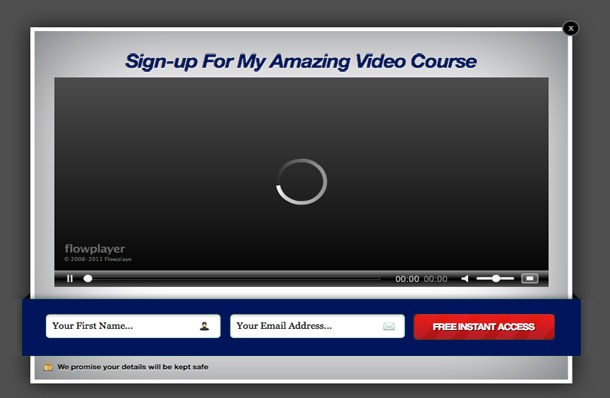
5 - Video PopUp


Sometimes, video just works best.

I have various video sales letters, from the short and sweet, to the 15 minute long informational videos, and it’s good to be able to display these videos on relevant pages.

For example, I recently created a 7-day video course, for free, to help promote my paid course. I had a video popup appear to visitors on the pages where the topics were mentioned, asking them to opt in.

This way, I can talk to them through the medium they will expect to see me though, and I’m only targeting relevant content.

It also means that I can use my regular pop ups on the other pages.

(Premium theme below)


6 - Redirection Pop Up for Posts Related to Products


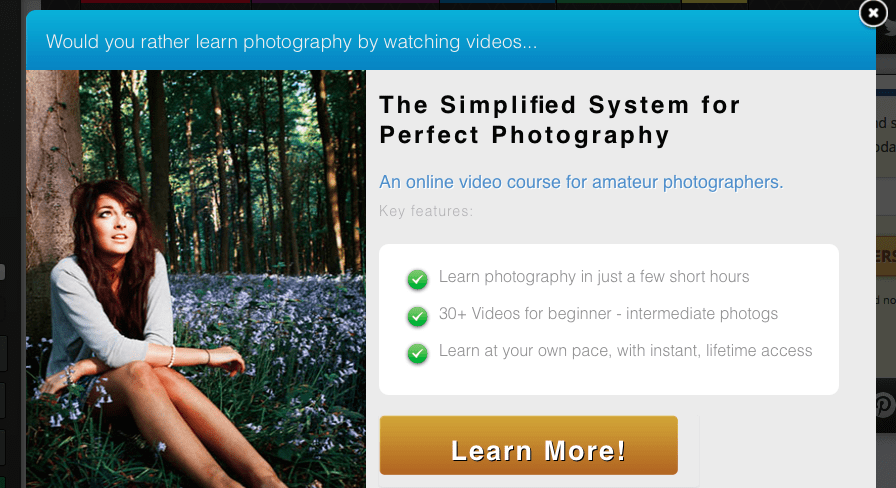
My front-end video course for amateur photographers covers about 25 different posts on my website. They were simply adapted into videos and sold as a package.

Because I already have written versions of these videos, I can then go back and target those posts with my popup.

I do this by adding them all to a single category, and then making the popup appear on pages from that category.

There’s already an ad inside each post, but the popup appears as they enter each page, which helps to encourage them to view my paid product.

I find this kind of popup works best on page load because I can show my visitors the alternative, before they’ve even started reading.


7 - For Establishing Interest in a New Product Idea


This is an awesome trick, if I may say so myself.

I’m testing the market for a new course on composition, because it’s not worth me creating the course until I know whether there’s interest or not. Otherwise I’ll do months of work, for very little return.

I create a popup with a similar offer to the product that I’m going to create.

For me, I’m thinking about creating a photography composition product. So I created a popup, offering a free composition video I’d made, in return for their email address. Then I go into the Analytics in PopUp Domination and look at the conversion rate. If it’s good enough, I will create the course.

And if I do launch the course, I have a list of potential buyers.

I only make this popup appear on the composition category.


8 - Earning Money with An Affiliate Link


If you have a Clickbank account, you can start earning an affiliate commission on PopUp Domination with about 15 seconds worth of work.

You simply go into the affiliate settings, and enter your Clickbank username.

Now, not only are you collecting emails with PopUp Domination, but you’re advertising an affiliate product too.

You can view the affiliate information here.

(Premium theme below)


9 - Affiliate Contact Form PopUp


I use this pop up as an exit popup on my contact page, and an entrance popup on my affiliate page.

I’m always happy to have other people promote my products for me, and if I’ve managed to get them to go to a page where they might sign up, I want to do everything I can to get their contact.

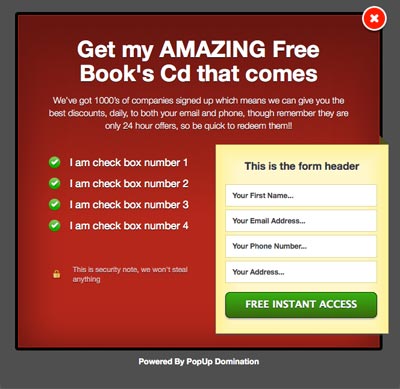
My pop up is really simple, and looks like the image below, only with a couple changes.

I ask for their name, email address, website, and online following.

In the bullet area I include demographic information, earnings per click, and information on promotional material, such as banners and email copy.

I also have PopUp Domination notify me whenever anyone signs up to the list, so that I can go and check it out, and get in contact with them.

The reason I use a list, rather than a regular contact form, is that I then have a list of email addresses I can easily send information about product launches, special offers, etc.

(Premium theme below)


10 - Analytics


If you work online, and you don’t know your data, then you’re just lazy.

One of the key ways to earn more money is to improve your conversion rate for more leads, or sales.

So for that reason, every page that could potentially lead to a conversion of some kind, is always being tested, and I’m always looking at the analytics.

PopUps are an incredibly powerful too, but you’ll never know how much powerful it could be, without the use of analytics.

Conclusion


The business’ main source of income comes from my list, so it makes sense for me to do everything I can to build on this list.

You may consider me to be bias, as the product was created by my brother, but I can say for certain that my business would not be where it is now without the use of PopUp Domination, and the premium theme pack.

I think that the majority of people do not realise the true potential of this plugin, and hopefully I’ve shown you some of the features you can unlock with the premium theme pack.

Along with OptimizePress, this is just one of the plugins that are essential to my business.
Read More »

Thursday, December 12, 2013

Gmail No Longer Blocking Images & Changes Default Image Displays ( Breaking News )

Gmail No Longer Blocking Images


While


Yahoo E-mail Down Today


What does this Mean ?


If you are using any form of email marketing already this is Good News for you and for all of your Gmail users who are subscribed to your list because it means that your email subscribers who use Gmail will soon see all of your images, without having to “turn them on” (though they can opt to turn them off). Exciting new this is ! For you, this means 2 things:

  1. Your images, seen by more subscribers, will have more of the aesthetic and informative effects you intend.

  2. Your reports may show more subscribers opening your emails. Since opens are recorded when images display, you’ll now be able to see opens from Gmail subscribers who weren’t previously loading your images.


The full report is here. While you’re at it, learn more about using images in your emails. In other news, Yahoo has been experiencing a partial email outage which may impact some of your subscribers. The outage could account for any low engagement you’re seeing from Yahoo users on your lists. To stay informed about the Yahoo! outage, see what Yahoo’s saying here.
Read More »

Monday, November 25, 2013

76 Viral Mailers - Huge List of Viral Mailers - Instantly Promote Offers to Huges Lists

If you are into affiliate marketing, network marketing, ppc marketing, maketing your own business or product, or maketing somebody's else product or service and don't have a huge e-mail list to send to then you need to check out my List of Viral Mailers which will help you with all of e-mail marketing needs, banner exchanges or text ads.  All of them have a FREE Version and several different paid versions depending on your marketing needs which can include how many people you want to mail, how often do you want to mail to them, how many daily credits do you get, and to access all of the premium features of each Viral Mailer site.

So Here I present to you the Complete List of Viral Mailers that I use :

List of Viral Mailers - Instantly Promote Offers to Huges Lists


1
605 votes
Vote Now
2
590 votes
Vote Now
3
523 votes
Vote Now
4
522 votes
Vote Now
5
480 votes
Vote Now
6
326 votes
Vote Now
7
323 votes
Vote Now
8
305 votes
Vote Now
9
295 votes
Vote Now
10
271 votes
Vote Now
11
224 votes
Vote Now
12
189 votes
Vote Now
13
161 votes
Vote Now
14
143 votes
Vote Now
15
135 votes
Vote Now
16
118 votes
Vote Now
17
114 votes
Vote Now
18
110 votes
Vote Now
19
110 votes
Vote Now
20
108 votes
Vote Now


21
95 votes
Vote Now
22
92 votes
Vote Now
23
85 votes
Vote Now
24
80 votes
Vote Now
25
80 votes
Vote Now
26
80 votes
Vote Now
27
79 votes
Vote Now
28
73 votes
Vote Now
29
71 votes
Vote Now
30
71 votes
Vote Now
31
70 votes
Vote Now
32
68 votes
Vote Now
33
68 votes
Vote Now
34
64 votes
Vote Now
35
61 votes
Vote Now
36
50 votes
Vote Now
37
46 votes
Vote Now
38
46 votes
Vote Now
39
45 votes
Vote Now
40
44 votes
Vote Now


41
40 votes
Vote Now
42
35 votes
Vote Now
43
35 votes
Vote Now
44
31 votes
Vote Now
45
26 votes
Vote Now
46
26 votes
Vote Now
47
25 votes
Vote Now
48
24 votes
Vote Now
49
21 votes
Vote Now
50
18 votes
Vote Now
51
18 votes
Vote Now
52
18 votes
Vote Now
53
18 votes
Vote Now
54
17 votes
Vote Now
55
16 votes
Vote Now
56
13 votes
Vote Now
57
12 votes
Vote Now
58
12 votes
Vote Now
59
11 votes
Vote Now
60
11 votes
Vote Now


61
11 votes
Vote Now
62
11 votes
Vote Now
63
11 votes
Vote Now
64
10 votes
Vote Now
65
10 votes
Vote Now
66
9 votes
Vote Now
67
8 votes
Vote Now
68
8 votes
Vote Now
69
8 votes
Vote Now
70
7 votes
Vote Now
71
7 votes
Vote Now
72
7 votes
Vote Now
73
7 votes
Vote Now
74
5 votes
Vote Now
75
3 votes
Vote Now
76
0 votes
Vote Now
Read More »