Native advertising is a new form of ad and it's becoming more popular every day. Unlike a banner, it looks natively on a website or an app, and often provides a value to its readers or viewers. The most common example of a native ad is a sponsored post....
Showing posts with label internet marketing. Show all posts
Showing posts with label internet marketing. Show all posts
Saturday, April 5, 2014

Sunday, March 2, 2014
Pay with a Tweet Generates Leads and Traffic

One of the things that prevents lead gen content from going viral is that anyone wanting to read that piece of content has to fill out a form. Not everyone is happy filling out a form with only an idea of what content lies behind it. So if you're supposed to get some traction to your landing page, but not sacrifice the number of leads you'll generate, what are you to do?
Lucky for us, there's one little tool that can make a big difference on the shareability of your lead gen content called Pay with a Tweet. It's a service that lets visitors access your lead content without having to “pay” for it by giving up any personal information on a form -- all they have to do is share it with their own networks or Facebook, Twitter, LinkedIn or Xing to access the content.
Not only is the tool super easy for your landing page visitors to use, but it's also quite easy to set up. Below, we'll walk you through the few steps to get your own Pay with a Tweet button and show you how we've used it on our own landing pages. By the end you'll have everything you need to set up Pay with a Tweet on your own landing pages.
How to Create a Pay With a Tweet Button
1) Go to the Pay with a Tweet website.
To create your own free Pay with a Tweet button, go to www.paywithatweet.com. Click "Create Your Free Campaign."
2) Fill in your personal information.

3) Choose which social networks people can "pay" with.
You’ll be asked to pick different social networks that you would like to allow on your button. We opted for choosing Facebook, Twitter, and LinkedIn so that people could pick which social network they would want to “pay” with (instead of just forcing them to use Twitter).

4) Craft the tweet's text.
You then can craft the Tweet’s text, which will also be used as the text shared on Facebook and LinkedIn if you choose these options for your button.
Under the Tweet text box, there is “Website URL” where you give the link you’d like to share. This would be a link back to the landing page that will have the Pay with a Tweet button. This link can only be 29 characters long, so you may need to shorten the link.

5) Add your landing page information.
Next, you'll need to insert the name of your content or product along with a URL for downloading it once it's shared. You can either link directly to the download file, or you could direct them to a thank-you page that has a download button. We opted for the thank-you page option because we had other content on our thank-you pages that we wanted to make sure they saw (e.g., trials or demos of our software).

There are also options to put the number of “sales” you want to cap your button at. For instance, you could only allow 100 people to use Pay with a Tweet to download your content or product instead of allowing it to stay unlimited. Or you could include a “valid until” date to prevent people from downloading it after a certain day.
When you're done, click "Create Your Button."
6) Grab the link or HTML code for your button.
Once you get to the “Embed in your Website” step, you can either grab the direct link or take the HTML code that is given for pre-made Pay with a Tweet buttons.
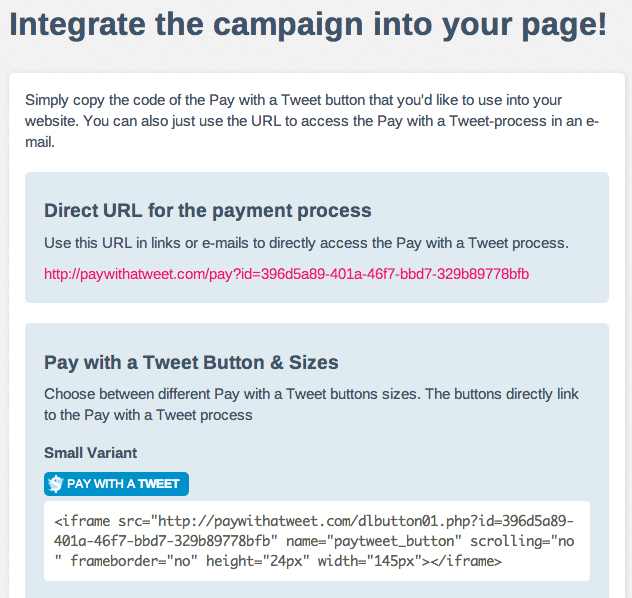

If you're okay with using Pay with a Tweet’s preformatted buttons, you can copy the HTML code and paste the button’s code into your landing page’s HTML ... and you're ready to rock.
If you want to design your own button, grab the direct link. Then, create your own button in Photoshop or PowerPoint using the size and colors you would like (here's a free template you can use as well). Save that image, insert the image on your landing page, and link it to the direct URL from the Pay with a Tweet website. And voila! Any time someone clicks your custom button, they will be prompted to pay with a Tweet in order to download the content or product.
3 Pay With a Tweet Experiments You Can Run
There are lots of ways you can get creative with "Pay With a Tweet" buttons on landing pages. Below are three tests we've run that you can try out, too.
Test #1: Inserting a Pay With a Tweet Button on a Landing Page
For my first test, I generated a Pay with a Tweet link on the website, and then created a custom button in PowerPoint. On one of our new landing pages, I placed that new button below our regular form. To do this, I added a new module below our form in the page’s template.
You can also see that I placed “OR” text between the form and the Pay with a Tweet button. This helped me clarify for the visitors on this page that they could access the content by filling out the form or paying for it with a Tweet.

The results for this test were not very conclusive, so I took the test a bit further the next month…
Test #2: Using Smart Content With Pay With a Tweet
My second test was very similar to my first test, but with a slight change. If you are worried that you won’t be able to generate as many leads with Test #1, you can try this test. Test #2 used smart content to only make the Pay with a Tweet button appear for existing leads and customers.
Before, visitors who were not leads could have opted for the Pay with a Tweet option. This impacted the number of leads generated on the landing page. Using smart content allowed the Pay with a Tweet to show only to those who had already filled out a form before. We generated many new leads this way without having to worry about the impact it had on our conversion rates.

Test #3: Using Pay With a Tweet on a Thank-You Page
Not only can you use Pay with a Tweet on your main landing pages, but you can also use it on your thank-you pages. In this experiment, I created a Pay with a Tweet link the same way as before, but I created a new custom button this time.
I placed the new button on thank-you pages where we offered people a “bonus” item, such as a free complimentary template or tip sheet. In order to get this bonus item, leads had to share the content with their social networks first.

This test was very successful because everyone who was Paying with a Tweet here had already converted on the landing page. Any additional leads generated from this button were seen as a nice bonus.
These are just a few tests we've run on our landing pages, but there's plenty more experiments you can run to get more leads and followers. You just need to try them for yourself!
How would you use Pay With a Tweet on your website? Share your ideas with everyone below.
This article was originally featured on HubSpot

Written by Lynelle Schmidt
Lynelle works on the Marketing Conversions team at HubSpot, specializing in lead generation and website optimization. Connect with her on Twitter @LynelleSchmidt
Lynelle works on the Marketing Conversions team at HubSpot, specializing in lead generation and website optimization. Connect with her on Twitter @LynelleSchmidt
Friday, November 29, 2013
Digital Minds: 12 Things Every Business Needs to Know About Digital Marketing
Digital Minds: 12 Things Every Business Needs to Know About Digital Marketing

Technology and the Internet are in flux. Giants like Apple, Google and Facebook are changing the way we interact with each other. Technologies move so quickly that jumping on the train can be daunting for businesses. But the route hasn't always been clear; social media, mobile marketing and search marketing campaigns are always changing. Luckily, digital marketing is still in its infancy and there's plenty of time to get on track. Written by WSI, Digital Minds brings industry-proven expertise to

List Price: $ 21.99
Price: $ 13.41
Internet Marketing An Hour a Day
Internet Marketing: An Hour a Day

Proven, task-based approach to developing winning internet marketing campaignsIf you've been seeking a practical, day-by-day, do-it-yourself plan for success in your Internet marketing, this is the book for you. The latest in the very popular Hour a Day series, this book gives you step-by-step instruction and clear action plans for all crucial aspects of successful internet marketing: SEO, website optimization, integration of social media and blogs, and pay-per-click strategies. Above all, i
Price:
Tuesday, November 26, 2013
6 NEW Google Analytics Features for Marketers
Do you use Google Analytics to help you make marketing decisions? Are you familiar with the latest changes in Google Analytics?
Google recently made the switch to secure search, which has resulted in a larger return of “not provided” keyword data in Analytics reports.
For marketers who used the information to guide their marketing and content, the loss of keyword data has been quite a blow.
Fortunately, Google also updated Analytics with more than 14 new features that are incredibly useful to business owners who make decisions based on how their audience interacts with their website and social profiles.
In this article, I’ll share what’s new in Google Analytics and how you can make the most of these changes to benefit your business.
When you log into your updated Google Analytics account, you’ll notice that Traffic Sources and Content have been replaced by Acquisition and Behavior.
The new Acquisition section offers you two new views: Overview and Channels.
The Overview report displays Analytics ABC data for your top channels (e.g., Social, Organic, Direct), sources (e.g., Facebook, Twitter, LinkedIn) or media (e.g., Organic, Referral, Email).
Essentially, the Overview report helps you see which channels bring in the most visitors, which channels bring in engaged visitors and which channels bring in visitors who convert into email subscribers or customers.

See information about visitor acquisition, behavior and conversions at a glance.
While the Overview report displays a summary of data, the Channels report displays a more detailed view of your visitor acquisition on a per-channel basis.
The most interesting part of this new Acquisition report is that you can define the channel groupings, which allows you to track different sources or media in a customized, consolidated group.
If you’re not happy with the default channel groupings, you can change them and add your main media or sources of traffic in different groups.

Edit the default channel groupings and create your own groups.
For example, you can group different traffic sources such as Facebook, Twitter and Google+ under the same group and call it “Social.”
Additionally, the Social section has a new Trackbacks report that displays all the back links with the landing pages they link to on your website.
A significant change in Google Analytics is the introduction of Analytics ABC, which is a new format for some of the Google Analytics reports that group data based on acquisition, user behavior and conversions.
This new report helps you see information about the acquisition of new visitors, how they behave on your website and how they convert into loyal readers, engaged visitors, email subscribers or customers.
You’ll be able to see Analytics ABC in action primarily in the Overview report under Acquisition (more on this new section below), but also in other reports such as Location, Demographics, New vs. Returning and Landing Pages.
The biggest outcome of this change is that now you see a variety of conversion data in the summary view of the report.
 Make informed decisions based on the conversion data available in the majority of new Google Analytics reports.
And if you track conversions for multiple goals, you can change the conversion goal in the Conversion group. Now you can see the same report conversion data for different goals without a lot of effort. How cool is that?
The segments in Google Analytics are now easier for new users to navigate, and at the same time are more powerful for advanced marketers and analysis experts.
Along with a new user interface, you can segment your visitors, do cohort analysis and create segment templates.

Once you click the Segments arrow, you will see the built-in segments, your custom segments and the ones you have starred.
You can create your own new segment or import a predefined segment from the Google Analytics Gallery, where you can find popular segments created by the Google Analytics team.
Until recently, a demographic dataset was missing from Google Analytics.
Now, data collected from DoubleClick third-party cookies is available in the new Demographic report. You’ll see valuable information about your audience’s gender, age and interests with just a couple of clicks.

Check your audience demographics from the Audience reports > Demographics.
No more guessing about who your ideal customer is. You can do things like:
To start seeing these reports, you’ll need to activate Demographics data by following these steps:
 It takes about 2 minutes to complete the steps above and start seeing demographics data in Google Analytics.
And don’t make this mistake when you change the Google Analytics tracking code.
Once you’ve finished the setup, you should see demographics data in your account in about 24-48 hours.
 Once you complete the demographics activation, you should start seeing data in the Google Analytics reports.
The Google Tag Manager update makes measuring things like calls to action or clicks on ads with event tracking easier by introducing Auto-Event Tracking. Now there’s no HTML or JavaScript code to worry about during your setup.

Use tags to integrate auto-event tracking on your website.
Google Tag Manager is essentially a free tool that allows you to easily manage the tracking codes you install on your websites, such as the Google Analytics tracking code, remarketing tracking pixels, AdWords Conversion Tracking or even Facebook Conversion Tracking.
You can manage all of the tracking codes from one place and edit them without having to manually edit the HTML of your site every time you do it.
To learn more about Auto-Event Tracking in the Google Tag Manager and how to integrate it, watch this video created by Justin Cutroni.
Learn more about how you can set up Auto-Event Tracking in Google Tag Manager.
Along with the interface changes, Google Analytics has introduced new and improved educational resources.
They’ve added walkthrough videos within the tools and introduced the Analytics Academy and the Digital Analytics Fundamentals course, which provides a foundation for marketers and business owners who want to better understand the principles of analytics and improve their business outcomes.

Now that you’ve read about the latest Google Analytics changes, log in! Use this article to explore and help you learn more about your online audience, easily track conversion data and make better marketing decisions for your business.
What do you think? Are you excited about the changes in Google Analytics? Which new feature or enhancement will have the biggest impact on your business? Share your thoughts in the comments section below.
Read More »
Google recently made the switch to secure search, which has resulted in a larger return of “not provided” keyword data in Analytics reports.
For marketers who used the information to guide their marketing and content, the loss of keyword data has been quite a blow.
Fortunately, Google also updated Analytics with more than 14 new features that are incredibly useful to business owners who make decisions based on how their audience interacts with their website and social profiles.
In this article, I’ll share what’s new in Google Analytics and how you can make the most of these changes to benefit your business.
6 NEW Google Analytics Features for Marketers
#1: New Google Analytics Reports
When you log into your updated Google Analytics account, you’ll notice that Traffic Sources and Content have been replaced by Acquisition and Behavior.
The new Acquisition section offers you two new views: Overview and Channels.
The Overview report displays Analytics ABC data for your top channels (e.g., Social, Organic, Direct), sources (e.g., Facebook, Twitter, LinkedIn) or media (e.g., Organic, Referral, Email).
Essentially, the Overview report helps you see which channels bring in the most visitors, which channels bring in engaged visitors and which channels bring in visitors who convert into email subscribers or customers.

See information about visitor acquisition, behavior and conversions at a glance.
While the Overview report displays a summary of data, the Channels report displays a more detailed view of your visitor acquisition on a per-channel basis.
The most interesting part of this new Acquisition report is that you can define the channel groupings, which allows you to track different sources or media in a customized, consolidated group.
If you’re not happy with the default channel groupings, you can change them and add your main media or sources of traffic in different groups.
Edit the default channel groupings and create your own groups.
For example, you can group different traffic sources such as Facebook, Twitter and Google+ under the same group and call it “Social.”
Additionally, the Social section has a new Trackbacks report that displays all the back links with the landing pages they link to on your website.
#2: New Analytics ABC Reporting
A significant change in Google Analytics is the introduction of Analytics ABC, which is a new format for some of the Google Analytics reports that group data based on acquisition, user behavior and conversions.
This new report helps you see information about the acquisition of new visitors, how they behave on your website and how they convert into loyal readers, engaged visitors, email subscribers or customers.
You’ll be able to see Analytics ABC in action primarily in the Overview report under Acquisition (more on this new section below), but also in other reports such as Location, Demographics, New vs. Returning and Landing Pages.
The biggest outcome of this change is that now you see a variety of conversion data in the summary view of the report.
Make informed decisions based on the conversion data available in the majority of new Google Analytics reports.And if you track conversions for multiple goals, you can change the conversion goal in the Conversion group. Now you can see the same report conversion data for different goals without a lot of effort. How cool is that?
#3: Better, Faster and Smarter Segmentation
The segments in Google Analytics are now easier for new users to navigate, and at the same time are more powerful for advanced marketers and analysis experts.
Along with a new user interface, you can segment your visitors, do cohort analysis and create segment templates.
Once you click the Segments arrow, you will see the built-in segments, your custom segments and the ones you have starred.
You can create your own new segment or import a predefined segment from the Google Analytics Gallery, where you can find popular segments created by the Google Analytics team.
#4: New Demographic Data
Until recently, a demographic dataset was missing from Google Analytics.
Now, data collected from DoubleClick third-party cookies is available in the new Demographic report. You’ll see valuable information about your audience’s gender, age and interests with just a couple of clicks.
Check your audience demographics from the Audience reports > Demographics.
No more guessing about who your ideal customer is. You can do things like:
- Figure out the demographics of your top 15% customers.
- Improve your remarketing campaigns in Google AdWords by targeting specific segments of your audience with different ads.
- Use Demographics and Interests to analyze A/B tests.
- Use Content Experiments from within Google Analytics to conduct A/B tests and then use Age segments to interpret the results and see which version of your test works for different segments.
To start seeing these reports, you’ll need to activate Demographics data by following these steps:
- Change your tracking code to support display advertising.
- Update your privacy policy to meet the policy requirements for display advertising.
- Enable demographic data in the Audience reports.
It takes about 2 minutes to complete the steps above and start seeing demographics data in Google Analytics.And don’t make this mistake when you change the Google Analytics tracking code.
Once you’ve finished the setup, you should see demographics data in your account in about 24-48 hours.
Once you complete the demographics activation, you should start seeing data in the Google Analytics reports.#5: New Tag Manager Auto-Event Tracking
The Google Tag Manager update makes measuring things like calls to action or clicks on ads with event tracking easier by introducing Auto-Event Tracking. Now there’s no HTML or JavaScript code to worry about during your setup.
Use tags to integrate auto-event tracking on your website.
Google Tag Manager is essentially a free tool that allows you to easily manage the tracking codes you install on your websites, such as the Google Analytics tracking code, remarketing tracking pixels, AdWords Conversion Tracking or even Facebook Conversion Tracking.
You can manage all of the tracking codes from one place and edit them without having to manually edit the HTML of your site every time you do it.
To learn more about Auto-Event Tracking in the Google Tag Manager and how to integrate it, watch this video created by Justin Cutroni.
Learn more about how you can set up Auto-Event Tracking in Google Tag Manager.
#6: Improved User Education
Along with the interface changes, Google Analytics has introduced new and improved educational resources.
They’ve added walkthrough videos within the tools and introduced the Analytics Academy and the Digital Analytics Fundamentals course, which provides a foundation for marketers and business owners who want to better understand the principles of analytics and improve their business outcomes.
Conclusion
Now that you’ve read about the latest Google Analytics changes, log in! Use this article to explore and help you learn more about your online audience, easily track conversion data and make better marketing decisions for your business.
What do you think? Are you excited about the changes in Google Analytics? Which new feature or enhancement will have the biggest impact on your business? Share your thoughts in the comments section below.
Fishing on Facebook - How To Reel in Customers ( Infographic )
Fishing seems simple. Throw a line in the water, wait for a bite, reel in a fish. But real fishing, just like fishing for customers on Facebook, is actually deceptively difficult. It requires finesse, strategy and skill. Facebook is a busy pond -- chock full of anglers, all fighting to hook fans and land them as customers. With millions of lines in the water, the angler who knows best what the fish want will walk away with biggest catch. And the fishermen clumsily slinging bait into the pond with no strategy will walk away empty-handed. Here, courtesy of Facebook app Post Planner, is an infographic that explains the art of angling for customers on Facebook. It will have you reeling in the big ones in no time.

Read More »
There’s a fine line between fishing and just standing on the shore like an idiot.
-Steven Wright.Fishing on Facebook - How To Reel in Customers ( Infographic )
Friday, November 1, 2013
How to Get Your First 1,000 Email Subscribers When Nobody Knows You
This is a guest contribution by Marya Jan, blogging coach from Writing Happiness.
What’s the biggest excuse you hear from people who are not getting the results they want from their blogging?
“I don’t know anyone online.”
Not ‘my content might not be good’. Not ‘I don’t a clear idea of what I am doing’. Not ‘I know it takes time and I am learning everything I can’.
None of that. It’s always because they don’t have any connections with the big shots.
Allow me to put up my hand and say this … I have over 1,000 subscribers (multiple times over actually) and I have done this under 18 months of blogging AND without having connections with any famous people.
I did meet Darren Rowse, Sonia Simone, Chris Garrett, Tim Ferris and Annabel Candy at the Problogger Conference in 2011 but I was so new that I was too scared to even introduce myself properly.
I am pretty sure this doesn’t count. So what does? So glad you asked.
If you are someone who has been blogging for a few months, you know how hard it is to attract readers. You spend insane amounts of time creating content but nobody takes you seriously. You hope to get a few shares, but all you hear is dead silence
You might be new-ish but you have quickly realized this reality: Blogging is hard work and sometimes it seems downright cruel..
Creating quality content is getting you nowhere (assuming it is high quality) and you need a plan B. And you can’t come up with anything to save your life.
I have another suggestion. I propose that you go back and revisit your plan A. Identify loopholes, see if you could improve things so that you actually don’t need any other plans.
That’s how I did it.
Your first plan might look something like this:
So basically after about two weeks worth of work, you are relying on getting your blog off the ground by befriending people in high places.
Let me tell you, this is not a particularly smart strategy.
Through own my experience and by through coaching other clients (Yes, I am a blogging coach), I have found that most influencers won’t take you seriously unlessyou have some sort of proven record.

Allow me to explain: Influencers are super busy people. They are very, very, very busy people. If you need to earn their attention, you need to prove you are worth it. So in my experience, you can have meaningful relationships with A-list bloggers but it doesn’t happen in the beginning. Not for most of us, anyway.
It takes time and lot of effort BEFORE they notice you. (And nobody will tell you this.)
If you trying to do this too early on, you are going about it in the wrong way. Instead, you should focus your time on your blog just so that you know what you are doing.
You need to do things right enough that you have a 1k subscribers worthy blog so you have the skill and confidence of approaching them properly.
So let’s have a look at the plan again, shall we?
After delivering hundreds of blog reviews and coaching many clients, I have found these to be the primary causes of why people don’t get their first 100 subscribers, let alone 1,000.
Your blog looks amateurish, tacky or just plain spammy.
When someone new lands on it for the first time, they get no sense of what the blog is about, who is writing it and if it’s any good. There are too many flashy ads, or too many images, colours, links and tabs competing for attention. The content doesn’t seem appealing. The headlines are boring, images are of poor quality, and everything is a big chunk of text.
Your blog title doesn’t tell them anything about who you are about and how you can help them. Your visitors are so confused that the only option that makes sense is to leave.
The easiest way to fix this is to make your site clutter free and get rid of all the unnecessary elements adding to the chaos. You want to make it as easy as you can for your readers to navigate.
Most people cram their sidebars with lots of information in order to look like they have been around for a while. That they know what they are doing. Please don’t. Things like tag clouds, categories, search boxes, links to other bloggers aren’t really helpful. Not really.
Don’t stuff your sidebar with ads either. I am guessing you don’t have enough traffic to make any decent money anyway.
You are not making it clear who the blog is for. You are not saying to a particular group of people (maybe you aren’t sure who they are?) that this blog is for them.
For instance, let’s say you are a business coach. However this is a very general term. If you don’t make it absolutely clear that you are writing for start-ups, or small business owners, or mid sized business, or executives; you are just confusing your readers.
One great way to make it happen is to say that in your tag line or in a mini author bio that you display on the sidebar. You’ve got to have people saying, ‘Yes, this seems perfect for me.’
People are really interested in person behind the blog. They want to know who that creative soul is. They want to like that person. They want to be that person.
A lot of people totally mess this up. Either they talk too much or too little.
Often they present the information in the wrong order. They start off with their story and why they write the blog and then barely touch upon how they can help you. People lose interest.
People want to know who writes this blog but more importantly they want to know why they should care.
Tell them why you are relevant to them, and follow it by your story and other details. And keep it brief.
One thing that will make the most difference to the number of readers you get is the display of social proof.
When people come to a place where they see others hanging out, they feel confident in making the same choice. For this reason, focus to create content that gets shared, liked and get commented on.
From day one, add credibility building elements to your site. The most popular of them all is the ‘As seen on’ testimonial. You want to land guest posts on popular blogs and then proudly display their logos on your site.
This is something that many new bloggers struggle to answer in their earlier days of blogging so I won’t say to worry too much about it. That being said, if you spend some time thinking about what makes you different from the rest, you will find it easier to create content and would be more focused in related tasks.
There are several ways to help make you stand out from the crowd.

This is the thing; you are the most unique thing about your blog. There is nobody else just like you, with your point of view, insights and experiences.
The more you accept that and highlight it, the more chances you will have to appeal to those who are truly the right people. So really hone in your voice and bring out that personality of yours for the world to see. People can’t get that anywhere else.
They love the snark in Ashley Ambridge’s voice. They love Danielle Laporte’s soul. They adore Darren Rowse for a kind, down to earth spirit. What’s your secret sauce?
Yes, you are providing solutions to somebody’s problems but why are you doing it, really? What is your big idea? What do you stand for?
Do you believe life is an adventure? Chris Guillebeau
Do you want to show people how work less and play more? Tim Ferris
Do you want people to focus on the essentials? Leo Babauta
Do you want to empower women in business and life? Marie Forleo
Do you want to offer personal development advice for smart people? Steve Palvina
If you believe in something, people will believe in you. Tell them now.
Your design, colours, logo, tag line, images – everything speaks volumes and appeal to a certain kind of person.
Want to attract go getters, how about choosing red or maroon in your theme? How about appealing to gentle, earth loving souls with the light green colour? Inspiration is your game then might soothing blue is what you need.
Your design needs to support your theme, mission and content and make you stronger. Marie Forleo is hip, Mars Dorian is bold, what are you?
Your specific market, your content, the needs you solve and the exact solution you provide based on your expertise is often enough to differentiate you from others.
Derek Halpern teaches you marketing based on research findings. Corbett Barr teaches you how to get traffic because he has done it. What have you got on offer?
Many new bloggers are finding it super hard to find new readers and to keep old ones also. One reason is because they don’t get them on their list. They don’t place a subscription box in a prominent position and don’t give them any reason to subscribe.
Shouldn’t the blog itself be good enough reason? Yes, it is, but adding an incentive to your sign up box works really well.
Don’t listen to anyone who tells you to just put together some old posts and offer as a freebie. One, nobody cares and even if somebody did, they won’t take you seriously.
But you don’t have to spend days or months creating something. Jon Morrow says the best opt-in offers are those that offer some sort of short cut of doing a task. A cheat sheet of sorts (His Headline Hacks is a great example).
Teach people to do one thing and do it really well. People don’t find long freebies appealing that take too long to read and would take months to implement. A report, mini ebook, white paper or a short webinar works well.
Finally people never sign up because they don’t know you exist. You have to actively go out and promote yourself.
Again, you might feel compelled to remind me that that’s why you need relationships with famous bloggers so they can promote you. Let me tell you that is not the only way you can drive traffic to your blog.
You can guest post on mid-sized blogs. Often they don’t publish many guest posts so their audience might be more inclined to follow you. You can create YouTube videos, Slideshare presentations, answer questions in forums such as yahoo answers and Quora.
And no, I am not snubbing social media. But social media does take a while to work, especially if you are new. By all means participate in social media but don’t make it the main focus of your traffic generation efforts.
The point is: you have to promote a lot. Spend 20% of your time creating content for your own blog and the rest on promoting it.
Then what is? Creating super useful content. Being able to stand out from the rest. And for the right people too. And to be worthy of getting some attention from A-list bloggers. Then you can approach the bloggers you worship. There is a good chance you’ll hear back.
Marya Jan is on a mission to help bloggers get their 1,000 subscribers. She is a blogging coach atWriting Happiness. Grab her free ebook ‘9 New Rules of Blogging – Grow Your Business with Little Traffic, No Connections & Limited Hours.
Read More »
What’s the biggest excuse you hear from people who are not getting the results they want from their blogging?
“I don’t know anyone online.”
Not ‘my content might not be good’. Not ‘I don’t a clear idea of what I am doing’. Not ‘I know it takes time and I am learning everything I can’.
None of that. It’s always because they don’t have any connections with the big shots.
Allow me to put up my hand and say this … I have over 1,000 subscribers (multiple times over actually) and I have done this under 18 months of blogging AND without having connections with any famous people.
I did meet Darren Rowse, Sonia Simone, Chris Garrett, Tim Ferris and Annabel Candy at the Problogger Conference in 2011 but I was so new that I was too scared to even introduce myself properly.
I am pretty sure this doesn’t count. So what does? So glad you asked.
If you are someone who has been blogging for a few months, you know how hard it is to attract readers. You spend insane amounts of time creating content but nobody takes you seriously. You hope to get a few shares, but all you hear is dead silence
You might be new-ish but you have quickly realized this reality: Blogging is hard work and sometimes it seems downright cruel..
How to Get Your First 1,000 Email Subscribers
When Nobody Knows You
You know honeymoon period is over
Creating quality content is getting you nowhere (assuming it is high quality) and you need a plan B. And you can’t come up with anything to save your life.
I have another suggestion. I propose that you go back and revisit your plan A. Identify loopholes, see if you could improve things so that you actually don’t need any other plans.
That’s how I did it.
Your first plan might look something like this:
- Start a blog
- Pick a topic
- Identify your audience
- Create useful content
- Promote that content
- Differentiate yourself from others (All of this within 2 weeks)
- Form relationships with influencers
- Grow your blog by leaps and bounds
So basically after about two weeks worth of work, you are relying on getting your blog off the ground by befriending people in high places.
Let me tell you, this is not a particularly smart strategy.
Through own my experience and by through coaching other clients (Yes, I am a blogging coach), I have found that most influencers won’t take you seriously unlessyou have some sort of proven record.

Allow me to explain: Influencers are super busy people. They are very, very, very busy people. If you need to earn their attention, you need to prove you are worth it. So in my experience, you can have meaningful relationships with A-list bloggers but it doesn’t happen in the beginning. Not for most of us, anyway.
It takes time and lot of effort BEFORE they notice you. (And nobody will tell you this.)
If you trying to do this too early on, you are going about it in the wrong way. Instead, you should focus your time on your blog just so that you know what you are doing.
You need to do things right enough that you have a 1k subscribers worthy blog so you have the skill and confidence of approaching them properly.
So let’s have a look at the plan again, shall we?
After delivering hundreds of blog reviews and coaching many clients, I have found these to be the primary causes of why people don’t get their first 100 subscribers, let alone 1,000.
1. Poor first Impression
Your blog looks amateurish, tacky or just plain spammy.
When someone new lands on it for the first time, they get no sense of what the blog is about, who is writing it and if it’s any good. There are too many flashy ads, or too many images, colours, links and tabs competing for attention. The content doesn’t seem appealing. The headlines are boring, images are of poor quality, and everything is a big chunk of text.
Your blog title doesn’t tell them anything about who you are about and how you can help them. Your visitors are so confused that the only option that makes sense is to leave.
The easiest way to fix this is to make your site clutter free and get rid of all the unnecessary elements adding to the chaos. You want to make it as easy as you can for your readers to navigate.
Most people cram their sidebars with lots of information in order to look like they have been around for a while. That they know what they are doing. Please don’t. Things like tag clouds, categories, search boxes, links to other bloggers aren’t really helpful. Not really.
Don’t stuff your sidebar with ads either. I am guessing you don’t have enough traffic to make any decent money anyway.
2. Unspecified target audience
You are not making it clear who the blog is for. You are not saying to a particular group of people (maybe you aren’t sure who they are?) that this blog is for them.
For instance, let’s say you are a business coach. However this is a very general term. If you don’t make it absolutely clear that you are writing for start-ups, or small business owners, or mid sized business, or executives; you are just confusing your readers.
One great way to make it happen is to say that in your tag line or in a mini author bio that you display on the sidebar. You’ve got to have people saying, ‘Yes, this seems perfect for me.’
3. Incomplete About page
People are really interested in person behind the blog. They want to know who that creative soul is. They want to like that person. They want to be that person.
A lot of people totally mess this up. Either they talk too much or too little.
Often they present the information in the wrong order. They start off with their story and why they write the blog and then barely touch upon how they can help you. People lose interest.
People want to know who writes this blog but more importantly they want to know why they should care.
Tell them why you are relevant to them, and follow it by your story and other details. And keep it brief.
4. Negative social proof
One thing that will make the most difference to the number of readers you get is the display of social proof.
When people come to a place where they see others hanging out, they feel confident in making the same choice. For this reason, focus to create content that gets shared, liked and get commented on.
From day one, add credibility building elements to your site. The most popular of them all is the ‘As seen on’ testimonial. You want to land guest posts on popular blogs and then proudly display their logos on your site.
5. No point of difference
This is something that many new bloggers struggle to answer in their earlier days of blogging so I won’t say to worry too much about it. That being said, if you spend some time thinking about what makes you different from the rest, you will find it easier to create content and would be more focused in related tasks.
There are several ways to help make you stand out from the crowd.

Being you
This is the thing; you are the most unique thing about your blog. There is nobody else just like you, with your point of view, insights and experiences.
The more you accept that and highlight it, the more chances you will have to appeal to those who are truly the right people. So really hone in your voice and bring out that personality of yours for the world to see. People can’t get that anywhere else.
They love the snark in Ashley Ambridge’s voice. They love Danielle Laporte’s soul. They adore Darren Rowse for a kind, down to earth spirit. What’s your secret sauce?
Your purpose
Yes, you are providing solutions to somebody’s problems but why are you doing it, really? What is your big idea? What do you stand for?
Do you believe life is an adventure? Chris Guillebeau
Do you want to show people how work less and play more? Tim Ferris
Do you want people to focus on the essentials? Leo Babauta
Do you want to empower women in business and life? Marie Forleo
Do you want to offer personal development advice for smart people? Steve Palvina
If you believe in something, people will believe in you. Tell them now.
The way you dress
Your design, colours, logo, tag line, images – everything speaks volumes and appeal to a certain kind of person.
Want to attract go getters, how about choosing red or maroon in your theme? How about appealing to gentle, earth loving souls with the light green colour? Inspiration is your game then might soothing blue is what you need.
Your design needs to support your theme, mission and content and make you stronger. Marie Forleo is hip, Mars Dorian is bold, what are you?
Your offer
Your specific market, your content, the needs you solve and the exact solution you provide based on your expertise is often enough to differentiate you from others.
Derek Halpern teaches you marketing based on research findings. Corbett Barr teaches you how to get traffic because he has done it. What have you got on offer?
6. No incentive to sign up
Many new bloggers are finding it super hard to find new readers and to keep old ones also. One reason is because they don’t get them on their list. They don’t place a subscription box in a prominent position and don’t give them any reason to subscribe.
Shouldn’t the blog itself be good enough reason? Yes, it is, but adding an incentive to your sign up box works really well.
Don’t listen to anyone who tells you to just put together some old posts and offer as a freebie. One, nobody cares and even if somebody did, they won’t take you seriously.
But you don’t have to spend days or months creating something. Jon Morrow says the best opt-in offers are those that offer some sort of short cut of doing a task. A cheat sheet of sorts (His Headline Hacks is a great example).
Teach people to do one thing and do it really well. People don’t find long freebies appealing that take too long to read and would take months to implement. A report, mini ebook, white paper or a short webinar works well.
7. Lack of self promotion
Finally people never sign up because they don’t know you exist. You have to actively go out and promote yourself.
Again, you might feel compelled to remind me that that’s why you need relationships with famous bloggers so they can promote you. Let me tell you that is not the only way you can drive traffic to your blog.
You can guest post on mid-sized blogs. Often they don’t publish many guest posts so their audience might be more inclined to follow you. You can create YouTube videos, Slideshare presentations, answer questions in forums such as yahoo answers and Quora.
And no, I am not snubbing social media. But social media does take a while to work, especially if you are new. By all means participate in social media but don’t make it the main focus of your traffic generation efforts.
The point is: you have to promote a lot. Spend 20% of your time creating content for your own blog and the rest on promoting it.
Being smart or talented is not enough to build a successful blog
Then what is? Creating super useful content. Being able to stand out from the rest. And for the right people too. And to be worthy of getting some attention from A-list bloggers. Then you can approach the bloggers you worship. There is a good chance you’ll hear back.
Marya Jan is on a mission to help bloggers get their 1,000 subscribers. She is a blogging coach atWriting Happiness. Grab her free ebook ‘9 New Rules of Blogging – Grow Your Business with Little Traffic, No Connections & Limited Hours.
Sunday, August 25, 2013
10 Social Media Marketing Do's and Don'ts
Social Media Marketing is not as easy as it seems being there are hundreds of social networks and there are a different set of rules, restrictions and social etiquette based on the social network that you market on. Of course from time to time everyone makes mistakes on social media...even the largest, most experienced brands. It happens. However, if you follow a few guidelines to help you avoid the pit holes or as some would call it the "The Valley of Death" as you travel down the social media marketing road, I'm pretty sure you could avoid making some of the mistakes that others have made before you. Here are 10 social media marketing do's and don'ts to learn from...

1. Keep it Short!
It has been proven that shorter posts get more engagement than longer posts. Nobody wants to read a book. On Twitter, you don't have much choice, you have to keep it brief because you only have 140 characters. However you should aim to keep your tweets even shorter, perhaps 120-130 characters, so that others have room to make a comment when they re-tweet you.
Read More »
10 Social Media Marketing Do's and Don'ts
SOCIAL MEDIA DO's:
1. Keep it Short!
It has been proven that shorter posts get more engagement than longer posts. Nobody wants to read a book. On Twitter, you don't have much choice, you have to keep it brief because you only have 140 characters. However you should aim to keep your tweets even shorter, perhaps 120-130 characters, so that others have room to make a comment when they re-tweet you.
Thursday, August 8, 2013
Your Mobile Money Site Review
This post is a review on a new product just release August 1st 2003 called Your Mobile Money Site. If you anything about marketing trends you know that the future consists of mobile marketing because more and more people spend more time on their mobile phones and tablets these days than they spend on an actual computer. So ok with that fact let me show you what this program is all about. Continue reading the Your Mobile Money Site Review to see how you can make money with mobile marketing.

Your Mobile Money Site is an internet marketing training and software program designed by Rob Benwell. Through his course and with this use of his software, Rob claims he can teach the novice marketer with little to no prior experience how to generate $550 per day with nothing more than a mobile phone and computer in as few as 15 minutes with just 3 clicks of a mouse.
In a nutshell, Your Mobile Money Site is about using websites to rank atop the search engines to get free traffic and residual income -- but with a twist. You learn what to sell based on things that people search for using their mobile phones. In addition, the Your Mobile Money Site software can be run on your mobile phone so you can put the software to work for you anywhere.
Read More »
Your Mobile Money Site Review
What is Your Mobile Money Site ?
Your Mobile Money Site is an internet marketing training and software program designed by Rob Benwell. Through his course and with this use of his software, Rob claims he can teach the novice marketer with little to no prior experience how to generate $550 per day with nothing more than a mobile phone and computer in as few as 15 minutes with just 3 clicks of a mouse.
What does Your Mobile Money Site do ?
In a nutshell, Your Mobile Money Site is about using websites to rank atop the search engines to get free traffic and residual income -- but with a twist. You learn what to sell based on things that people search for using their mobile phones. In addition, the Your Mobile Money Site software can be run on your mobile phone so you can put the software to work for you anywhere.
Friday, July 26, 2013
Guest Blogging Opportunity on TrafficMarketingDaddy.com
Guest Blogging Opportunity
on TrafficMarketingDaddy.com
We are looking to network with other bloggers in the same niche and for fresh new content related to our site (Internet Marketing, SEO, Traffic, Social Media, Affiliate Marketing, Blogging for Profits or any form of making money online that is Legal. Don't miss on out this Guest Blogging Opportunity on TrafficMarketingDaddy.com !

1. All Content must be written in English (You do the spelling & grammar and Just to be clear I don't care if you're in India or China or in the USA as long as it's in English and it understandable I would love to share your posts on my blog)
2. Please make sure that your content is original and related to the site , it will be checked by CopyScape.
3. No more than one outgoing link. ( I will make sure your link has a DoFollow tag on it to help you with one extra backlink)
4. Must include one related picture with text on the actual picture. Below is an example, this creates more traffic from pinterest.
If you are interested in guest blogging on this site please E-mail me at chiongmoney@gmail.com. Please share our site via social media!!!
P.S. - I would also be interested in any guest blogging opportunity to put some content on your site as well I said I am open to any networking opportunities with like-minded individuals as I believe the only way to succeed is to help others.
Subscribe to:
Posts (Atom)